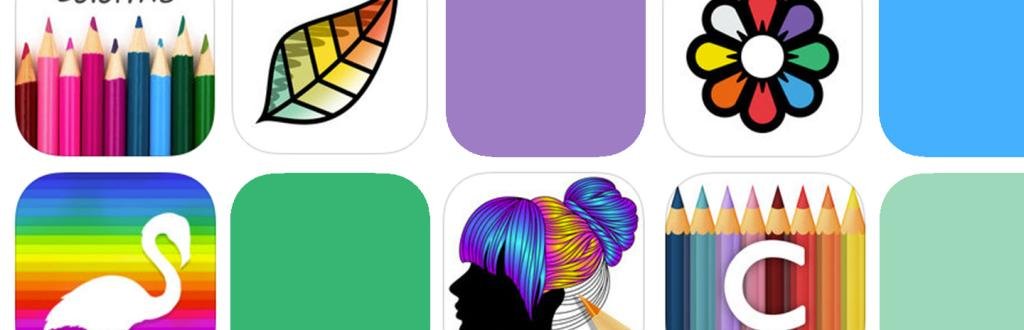
Your phone or tablet is all you need to color anywhere — waiting rooms, long flights, lunch breaks. The best coloring apps have come a long way since the early tap-to-fill days. Today’s options offer thousands of professionally illustrated designs, realistic brush tools, AI-generated pages, and even collaborative coloring with friends. We’ve tested and rounded up the 10 best adult coloring apps available right now, with current pricing and direct download links.
Quick Picks: Best App for Your Needs
- Best overall: Pigment — most realistic tools, closest to coloring on paper
- Best completely free: Happy Color — 40,000+ pages, zero subscription required
- Best for iPad + Apple Pencil: Pigment (or Procreate for advanced users — see below)
- Best for Android: Happy Color or Recolor — both fully-featured, well-maintained
- Best offline: Colorfy or Happy Color — full libraries work without wifi
- Best AI features: Chroma (buddy coloring + text-to-page) or Colorfly (AI page generation)
- Best community/social: Color Therapy — leaderboards, following, and sharing built in
- Best for daily colorists: Recolor — new pages every day, points system rewards consistency
- Best no-download option: coloring-4kids — color free in any browser, great with kids
The 10 Best Adult Coloring Apps (2026)
1. Pigment — Best Overall
Pigment is the gold standard for digital coloring. Rather than just tapping sections to fill with color, you use your fingertip (or Apple Pencil) like an actual tool — coloring back and forth to build up tone and blend. It offers over 6,000 professionally illustrated pages, with new ones added every week. You get a free page every day, and the premium subscription unlocks the full library along with a gorgeous set of markers, watercolors, and colored pencils.
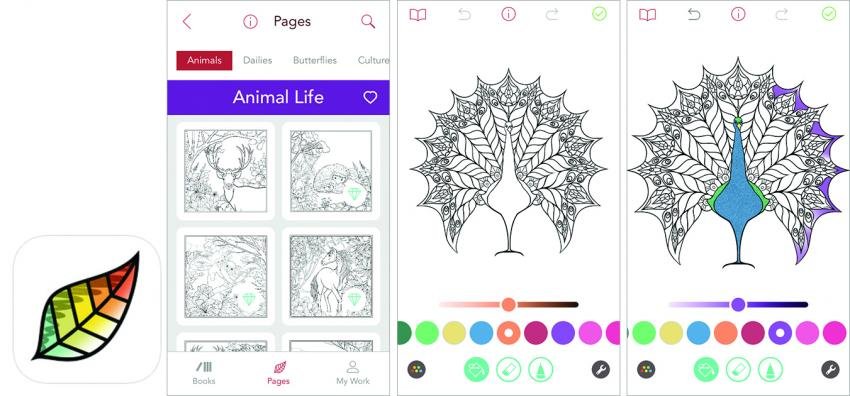
Cost: Free with one daily page · Premium from $9.99/month or $59.99/year (7-day free trial)
Download: App Store · Google Play
2. Happy Color — Best Free App
If you want maximum content with zero cost, Happy Color is unbeatable. The library tops 40,000 images — all completely free — spanning Disney, Marvel, nature, mandalas, holidays, and more. It’s a color-by-number style app, so each section is labelled with a number matching a color. Surprisingly satisfying and genuinely relaxing. New collections are added regularly and it’s one of the most actively maintained apps on both platforms.
Cost: Free (optional ad-removal purchase available)
Download: App Store · Google Play
3. Lake — Best for Art Lovers
Lake takes a beautifully considered approach to digital coloring. Every illustration in the app is created by a real artist, and part of each subscription fee goes directly back to those artists — a model we love. The library has over 1,500 unique illustrations organized into themed "books," and the brushwork tools are among the most tactile of any coloring app. A portion of every subscription directly supports the illustrators behind the pages, making this one of the most meaningful purchases in the category.
Cost: Free (one daily illustration) · $39.99/year or $8/month · Individual books from $3
Download: App Store (iOS only) · lakecoloring.com
4. Colorfy — The Fan Favourite
With over 25 million users, Colorfy has been a staple of the coloring app world for years — and it’s still going strong with regular updates in 2026. The library includes 25,000+ designs across animals, mandalas, pixel art, florals, and famous paintings. One standout feature: the app works completely offline, which makes it perfect for travel. Free daily pages are offered so you always have something to color without opening your wallet.
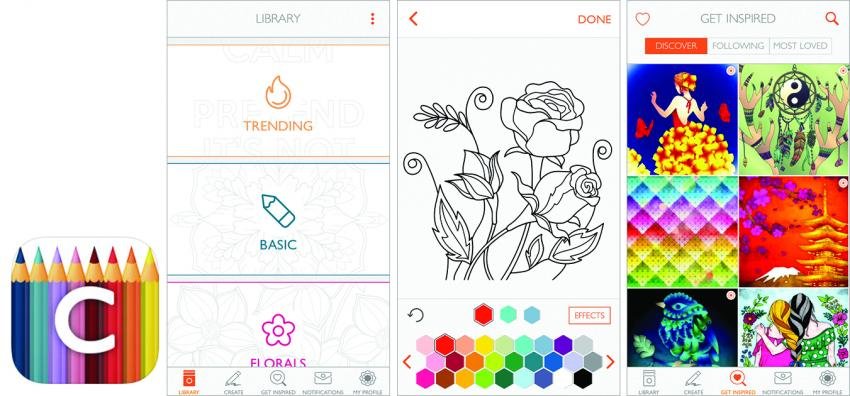
Cost: Free with daily pages · Colorfy Plus subscription for full access
Download: App Store · Google Play
5. Recolor — Best for Daily Colorists
Recolor updates its gallery every single day — making it the highest-frequency app in the category. With over 5,000 designs organized by theme and complexity (beginner to expert), there’s always something new to work on. You get 3 free pages daily just by showing up, and the points system rewards consistent use. If you’re the kind of colorist who sits down every evening for a session, this is your app.
Cost: 3 free pages/day · Premium from ~$17/month (7-day free trial)
Download: App Store · Google Play
6. Chroma — Best New Features
Chroma is the most innovative app on this list. Beyond a huge library of illustrations, it has two features no other coloring app can match: a "Buddy" mode that lets you color the same page simultaneously with a friend in real time, and an AI generation tool that creates custom coloring pages from a text description or a photo. Your completed pages can also be animated. It’s the most technologically ambitious coloring app available right now.
Cost: Free with limited access · Premium from $3.99/week or $49.99/year (3-day free trial)
Download: App Store · Google Play
7. Color Therapy — Best Community App
Color Therapy bills itself as a "social coloring community," and it earns that title. You can see what other colorists are creating, follow favorite artists, and share your finished pages. The library holds 5,000+ designs across flowers, mandalas, animals, fashion, food, and gothic themes — and a June 2024 update introduced Top Coloring Artists and Top Repainters leaderboards that give the app a genuinely fun competitive edge. You can also play your own music through the app while you color.
Cost: Free · VIP subscription ~$90/year
Download: App Store · Google Play
8. ColorArt — Best for Florals & Mandalas
ColorArt keeps things beautifully focused. If florals, botanicals, and geometric mandalas are your thing, this is the cleanest, most dedicated app for exactly that. The interface is simple — tap to fill, choose your palette — but the illustrations themselves are genuinely lovely. New content is added regularly, and the Deluxe subscription is one of the more reasonably priced options in the category.
Cost: Free · ColorArt Deluxe from $2.99/week or $34.99/year (1-week free trial)
Download: App Store · Google Play
9. Colorfly — Best AI Coloring Pages
The newer sibling to the original Colorfy, Colorfly is built around one exciting idea: generate your own coloring pages using AI. Type a description — "a fox in an enchanted forest" or "a mandala with sunflowers" — and get a printable or colorable design in seconds. It’s a genuinely fun creative tool, and the results are surprisingly good. Worth downloading just for the novelty, and useful if you’ve exhausted every existing library.
Cost: Free with limited generations · Premium for unlimited
Download: App Store
10. Recolor: Offline Version — Best for Travel
Many coloring apps still require a data connection to load pages. If you’re a frequent flyer or commuter who loses signal regularly, look for apps with explicit offline support — Colorfy and Happy Color both work fully without wifi. Download your pages before you leave the house and you’re set for the entire journey, no signal required.
Bonus Pick 1: Procreate — Best for iPad Power Users
Procreate isn't a dedicated coloring app, but it's used by thousands of adult colorists as their primary digital tool. You can import any PDF coloring page directly into the app and color it with 200+ professional brushes — watercolors, oil pastels, airbrush, pencils, and more. The Apple Pencil support is second to none, layers are unlimited, and the canvas size is unrestricted. It was named Apple's App of the Year for good reason.
The tradeoff: iPad-only, and it has a steeper learning curve than a dedicated coloring app. But for someone ready to treat their tablet like a real canvas and move beyond fill-the-section coloring, nothing else comes close.
Cost: One-time $12.99 · No subscription ever
Download: App Store (iPad only)
Bonus Pick 2: Color 4 Kids — Best No-Download Option
Every other entry here needs an install, but sometimes you just want to color now — on a shared device, a work laptop, or a tablet with no storage to spare. Color 4 Kids runs entirely in your browser: open the page and you're coloring in seconds, with no download, no account, and no in-app purchases.
It's built for kids, but that's exactly what makes it a quiet win for adults too — it's the easiest way to color alongside one. Pass the tablet around after dinner, or keep a restless kid happy on a rainy afternoon while you fill in a page of your own. Not a replacement for Pigment or Procreate, but the most frictionless way to start.
Cost: Free · No subscription, no app required
Download: Not required — color online in your browser
Whichever app you choose, the beauty of digital coloring is that your supplies are always with you. Try a few — most offer free trials — and find the one that fits your style.
Quick Comparison
| App | Best For | Free Content | Platforms |
|---|---|---|---|
| Pigment | Realistic tools | 1 page/day | iOS · Android |
| Happy Color | Most free content | 40,000+ pages free | iOS · Android |
| Lake | Art & artist support | 1 page/day | iOS only |
| Colorfy | Offline use | Daily free pages | iOS · Android |
| Recolor | Daily colorists | 3 pages/day | iOS · Android |
| Chroma | AI & buddy coloring | Limited | iOS · Android |
| Color Therapy | Community & social | Yes | iOS · Android |
| ColorArt | Florals & mandalas | Yes | iOS · Android |
| Colorfly | AI page generation | Limited | iOS only |
| Procreate ✦ | iPad power users | Full app ($12.99 once) | iPad only |
✦ Bonus pick — not a dedicated coloring app, but widely used by colorists for importing and coloring PDF pages.
Still prefer the feel of paper and pencils? Browse our library of 1,000+ printable adult coloring pages — print your favourites and color them your way.
Frequently Asked Questions
What is the best completely free adult coloring app?
Happy Color is the strongest fully-free option — 40,000+ images with no subscription wall and no paywalled core content. Colorfy is a close second if you want daily free pages with a larger style variety. Both are available on iOS and Android.
Which coloring apps work offline?
Colorfy and Happy Color both work fully without a wifi or data connection. Download your chosen pages while you have signal, then color anywhere — flights, commutes, areas with no coverage. Most other apps on this list require a connection to load new content, though some cache recently opened pages.
What is the best coloring app for iPad and Apple Pencil?
Pigment offers the best dedicated coloring experience on iPad, with full Apple Pencil pressure sensitivity and tools that genuinely feel like physical media. For colorists who want to go further — importing custom PDF pages, using layers, or working with professional brush sets — Procreate ($12.99 one-time) is unmatched as an all-round creative tool.
What is the best coloring app for Android?
Happy Color and Recolor are both polished, actively maintained Android apps. Happy Color wins on volume of free content (40,000+ pages at no cost); Recolor wins if you want fresh pages every single day and enjoy the points and rewards system for consistent colorists.
Is there a coloring app that creates pages from your own ideas?
Yes — Colorfly lets you type a description (like "a fox in an enchanted forest") and generates a colorable line-art page in seconds. Chroma has a similar AI generation tool built in alongside its regular library. For maximum flexibility, Procreate (iPad) lets you import any image or PDF as a coloring layer.
Are adult coloring apps good for stress relief?
Yes. The focused, repetitive nature of coloring activates the same mental state as light meditation — it narrows attention and quiets background mental noise. Apps like Lake and Color Therapy are specifically designed around the mindfulness angle. The portability of apps means you can pick up a session anywhere, without needing to carry physical supplies.